What Form 5695 is
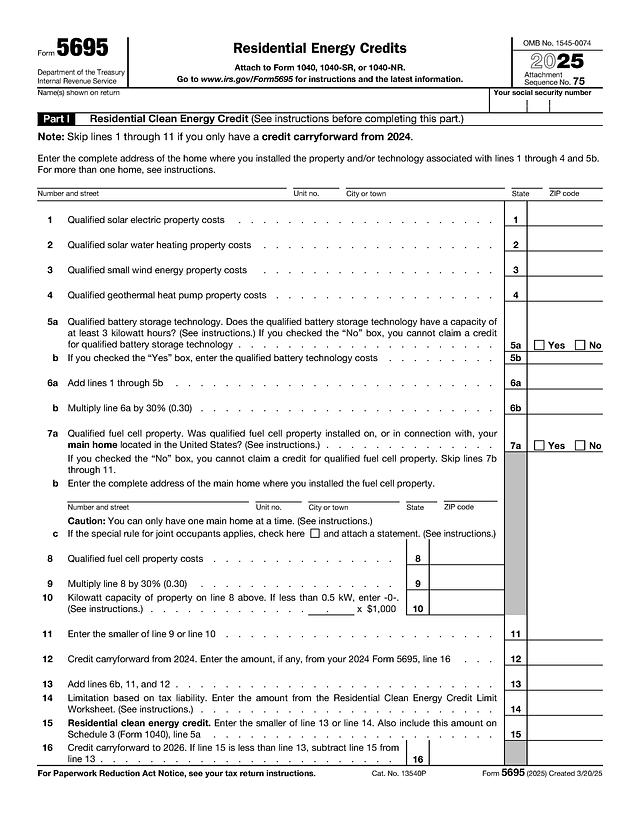
Form 5695, Residential Energy Credits, is the Internal Revenue Service form used to claim two federal tax credits for home energy upgrades: the Residential Clean Energy Credit (Part I) and the Energy Efficient Home Improvement Credit (Part II). It is attached to your Form 1040, 1040-SR or 1040-NR. The result flows to Schedule 3 (Form 1040), line 5a for Part I and line 5b for Part II.
Who typically needs it
Homeowners who paid for solar panels, a solar water heater, a small wind turbine, a geothermal heat pump, battery storage or a fuel cell use Part I. Homeowners who installed insulation, exterior doors, windows, a heat pump, a central air conditioner, a gas or oil furnace, a biomass stove or who paid for a home energy audit use Part II. If you only carry a credit forward from 2024, you can skip lines 1 through 11 and start at line 12.
What you need before you start
- Your name and Social Security number as shown on your return.
- The address of each home where the work was done.
- Invoices and receipts that separate equipment cost from labor and from any rebate or utility subsidy.
- For Part II property, the Qualified Manufacturer Identification Number (QMID) of each door, window, heat pump, air conditioner, water heater, furnace or boiler. The IRS says that for 2025 no credit is allowed for such an item without its QMID.
- The Residential Clean Energy Credit Limit Worksheet and the Energy Efficient Home Improvement Credit Limit Worksheet from the official instructions, because lines 14 and 31 depend on them.
How to fill it out online with PDF Editify
- On this page, click "Fill Template Now". The form opens in the editor with its fields ready.
- Click a field and type, or click a check box.
- Sign if needed (draw, type or upload a signature), then download. Downloading needs a plan: One Week Plan $3 one-time, Standard $10 per month or $100 per year, or Lifetime from $99 one-time.
Header
Enter the name or names shown on your return and your Social Security number. On page 2, the name and number are not repeated if they appear on the other side.
Part I: Residential Clean Energy Credit (lines 1 to 16)
Enter the home address first. Lines 1 to 4 take the costs of qualified solar electric, solar water heating, small wind and geothermal heat pump property. Line 5a asks whether battery storage has a capacity of at least 3 kilowatt hours; if you check Yes, put the cost on line 5b. Line 6a adds lines 1 through 5b and line 6b multiplies it by 30%. Line 7a asks about fuel cell property in your main home. If you check Yes, enter the address on 7b, the cost on line 8, the 30% result on line 9, the kilowatt capacity on line 10 and the smaller of lines 9 and 10 on line 11. Line 12 is the 2024 carryforward, line 14 comes from the limit worksheet, line 15 is the smaller of lines 13 and 14, and line 16 is the amount carried to 2026.
Part II, Section A: efficiency improvements (lines 17 to 20)
Lines 17a to 17c are Yes or No questions about main home location, original use and a five-year expected life. A No answer to any of them means you cannot claim this credit. Line 17d is the main home address and 17e asks whether improvements relate to construction of the home. Then fill the cost lines: insulation and air sealing (18a, 18b), exterior doors (19a to 19h, with QMIDs on 19b and 19d) and windows and skylights (20a to 20d, with up to four QMID and cost pairs).
Part II, Section B: energy property (lines 21 to 32)
Lines 21a and 21b qualify the residence and original placement in service. Line 22 covers central air conditioners, line 23 gas, propane or oil water heaters, line 24 furnaces and hot water boilers, and line 25 electrical panel upgrades, with a code on 25b and QMIDs on 25d. Line 26 is the home energy audit. Line 28 limits the line 27 total to $1,200, and line 29 covers heat pumps, heat pump water heaters and biomass stoves and boilers, capped at $2,000 on line 29h. Line 31 comes from the worksheet and line 32 is the smaller of lines 30 and 31.
Signing, and where and how to submit
Form 5695 has no signature line of its own. It is filed with your tax return, which you sign. File it with Form 1040, 1040-SR or 1040-NR electronically or by mail as described in your return instructions. To add a signature to the return itself, you can use sign a PDF online. Official page and instructions: IRS Form 5695.
Deadlines and fees
There is no fee to file the form. It is due with your return; for 2025 returns, the usual filing date is April 15, 2026, and an extension of time to file is until October 15. According to the IRS credit pages (checked 2026-11-16), the Residential Clean Energy Credit is not available for property placed in service after December 31, 2025, and the Energy Efficient Home Improvement Credit applies to qualifying property placed in service before 2026. Check the IRS pages linked above for current rules before relying on this.
Common mistakes
- Leaving out QMIDs for doors, windows, heat pumps and similar items in Part II.
- Including labor on building envelope items such as windows and doors, which the IRS says does not qualify, while labor for residential energy property can count.
- Not subtracting rebates or utility subsidies from the cost.
- Ignoring the per-item caps ($250 per door, $500 for all doors, $600 for windows, $150 for an audit) and the $1,200 and $2,000 annual limits.
- Claiming Part II for a rental property or for something that is not your main home.