What Form 4562 is
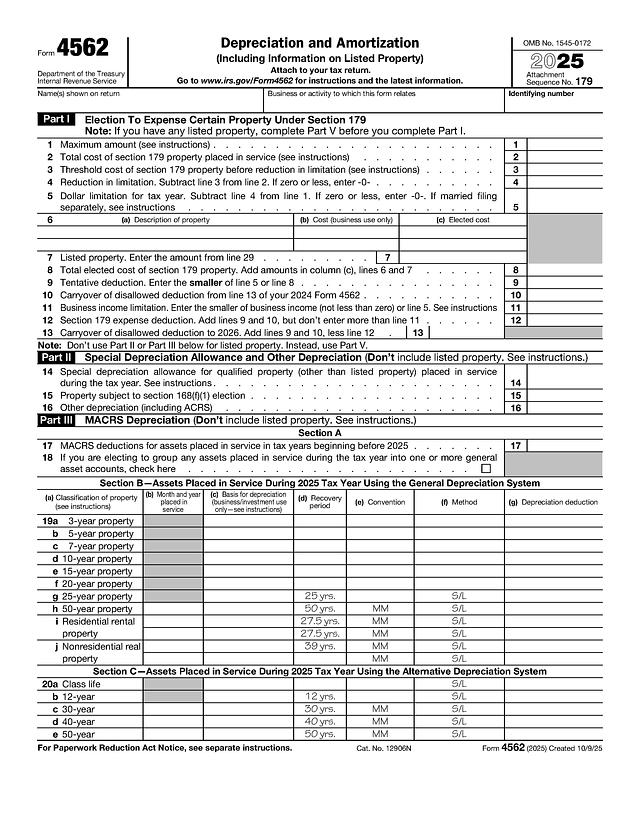
Form 4562, Depreciation and Amortization (Including Information on Listed Property), is the Internal Revenue Service form used to claim deductions for the cost of business property over time. It covers the section 179 expense election, the special depreciation allowance, regular MACRS depreciation, listed property such as vehicles, and amortization. The edition on this page is for tax year 2025. It is attached to your tax return, and you file a separate Form 4562 for each business or activity that needs one.
Who typically needs it
Sole proprietors who file Schedule C, landlords, partnerships, S corporations and corporations use it. According to the IRS instructions (checked 2026-11-17), you generally file it if you claim depreciation on property placed in service in 2025, a section 179 deduction (including a carryover), depreciation on a vehicle or other listed property, or amortization that begins in 2025.
What you need before you start
- Your name, the business or activity name, and your identifying number.
- A list of each asset with description, date placed in service and business cost.
- Last year's Form 4562 for the section 179 carryover (line 10) and your depreciation schedule for older assets (line 17).
- For vehicles: mileage logs and the business use percentage.
- The Instructions for Form 4562.
How to fill it out online with PDF Editify
- On this page, click "Fill Template Now". The form opens in the editor with its fields ready to type into.
- Click a field and type, or click a Yes, No or check box.
- Sign if you need to (draw, type or upload a signature), then download. Downloading needs a plan: One Week Plan $3 one-time, Standard $10 per month or $100 per year, or Lifetime from $99 one-time.
Header
Enter the name or names shown on your return, the business or activity the form relates to, and your identifying number.
Part I: section 179 election (lines 1 to 13)
If you have listed property, complete Part V first. Line 1 is the maximum amount, line 2 the total cost of section 179 property placed in service, line 3 the threshold cost, and line 4 the reduction in limitation. Line 5 is the dollar limitation for the year. On line 6, list each property with its description, business cost and elected cost. Line 7 brings in listed property from line 29, line 8 totals the elected cost, and line 9 is the smaller of lines 5 and 8. Line 10 is last year's carryover, line 11 the business income limitation, line 12 the section 179 deduction and line 13 the carryover to next year.
Parts II and III: special allowance and MACRS (lines 14 to 20)
Line 14 is the special depreciation allowance, line 15 is property under a section 168(f)(1) election, and line 16 is other depreciation. Line 17 covers MACRS deductions for assets placed in service before 2025, and line 18 is a check box for general asset accounts. In Section B (lines 19a to 19j), enter each class of property with the month and year placed in service, basis, recovery period, convention, method and depreciation deduction. Section C (lines 20a to 20e) is for the Alternative Depreciation System.
Part IV: summary (lines 21 to 23b)
Line 21 carries the listed property total from line 28. Line 22 adds line 12, lines 14 through 17, lines 19 and 20 in column (g), and line 21, and is entered on the appropriate lines of your return. Lines 23a and 23b are for costs capitalized under section 263A.
Part V: listed property (lines 24 to 41)
Line 24 asks about evidence of business use and whether you own, lease or charter an aircraft. Lines 25 to 27 list each property with date, business use percentage, basis, recovery period, method, deduction and elected section 179 cost. Lines 28 and 29 total the columns. Section B (lines 30 to 36) collects miles and personal use for up to six vehicles. Section C (lines 37 to 41) is for employers who provide vehicles to employees.
Part VI: amortization (lines 42 to 44)
Line 42 lists costs that begin amortizing this year with the date, amount, code section, period and deduction. Line 43 is amortization of earlier costs and line 44 is the total.
Signing, and where and how to submit
Form 4562 has no signature line. It is attached to your return, which you sign, and filed as the return instructions direct. To sign the return itself, you can use sign a PDF online. Official page: IRS Form 4562.
Deadlines and fees
There is no fee and no separate deadline. It is due with the return it supports; for 2025 returns the usual due date for individuals is April 15, 2026, with an extension to October 15. According to the IRS instructions (checked 2026-11-17), the 2025 section 179 maximum is $2,500,000, reduced dollar for dollar once qualifying property placed in service exceeds $4,000,000. The special depreciation allowance is 100% for property acquired after January 19, 2025, with an election for a lower rate. Confirm current numbers in the instructions.
Common mistakes
- Putting listed property such as vehicles in Part III instead of Part V.
- Skipping the carryover from last year's line 13 on line 10.
- Entering the full cost instead of the business use portion as basis.
- Using the wrong recovery period or convention for a property class.
- Not keeping mileage logs or other evidence for line 24.