What Form 8821 is
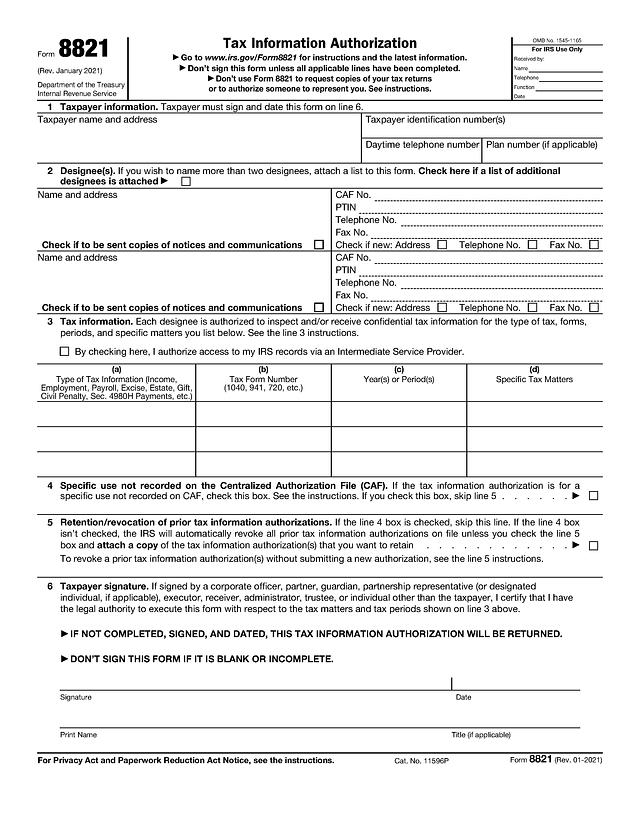
Form 8821, Tax Information Authorization, is the Internal Revenue Service form a taxpayer uses to let a named person or firm look at their confidential tax records. The designee can inspect and receive information for the tax types, forms and periods you list on line 3. The form does not let the designee speak for you or sign anything on your behalf. For that you need Form 2848, covered in our power of attorney guide. The IRS instructions also say not to use Form 8821 to request copies of your returns.
Who typically needs it
- Individuals who want an accountant, enrolled agent or bookkeeper to view their IRS account, notices or transcripts.
- Business owners who give a payroll provider, lender or advisor access to employment or income tax records.
- People applying for a mortgage or other loan where the lender needs to confirm tax data with the IRS.
- Executors, trustees, guardians and corporate officers signing for someone else, who must certify their legal authority on line 6.
What you need before you start
- The taxpayer's name, address and taxpayer identification number (SSN, ITIN or EIN). For a joint return, each spouse files a separate Form 8821.
- The designee's full name and address. If the designee is a tax professional, add their CAF number and PTIN when they have them.
- The types of tax, form numbers and years or periods you want covered, for example Income, 1040, 2023 through 2025.
- The official Form 8821 page and the instructions open in another tab.
How to fill out Form 8821 online with PDF Editify
- Open this page and click Fill Template Now. The form opens in the editor with its fields ready.
- Click a field and type. Use the checkboxes where the form shows a box.
- Add your signature by drawing, typing or uploading it.
- Download the finished PDF. Downloading requires a plan, while opening and filling does not need a card.
Line 1: Taxpayer information
Enter the taxpayer's name and address, the identification number or numbers, and a daytime telephone number. Fill in the plan number only if the authorization concerns an employee plan.
Line 2: Designee(s)
The form has room for two designees. Enter each name and address, then the CAF number, PTIN, telephone and fax numbers. Tick Check if to be sent copies of notices and communications only if you want that designee to receive IRS notices. Tick Check if new next to the address or telephone number when it has changed from what the IRS has on file. If you name more than two designees, tick the box at the top of line 2 and attach a list.
Line 3: Tax information
Complete one row per matter. Column (a) is the type of tax information, such as Income or Employment. Column (b) is the form number, such as 1040 or 941. Column (c) is the year or period, and column (d) is any specific tax matter. The instructions explain how to list years and what is not accepted, such as a general reference to "all years". There is also a box to authorize access through an Intermediate Service Provider.
Lines 4 and 5: Specific use and prior authorizations
Tick line 4 only if the authorization is for a specific use that is not recorded on the Centralized Authorization File, and then skip line 5. Otherwise the IRS revokes earlier authorizations on file unless you tick the line 5 box and attach copies of the ones you want to keep. Read the line 4 and line 5 instructions before deciding.
Line 6: Taxpayer signature
Sign and date, print your name and add a title if you sign for an entity or another person. The form says an incomplete or unsigned authorization will be returned, and not to sign a blank or incomplete form.
Signing and submitting
You can add a signature in the editor with our sign PDF tool. Where to send the form (fax or mail address) depends on your state and the matter, so use the "Where to file" section of the official instructions. Check there for current options, including whether an electronic route applies to you. Keep a copy for your records and give one to the designee.
Deadlines and fees
- Fee: the IRS does not charge a fee to file Form 8821 (IRS Form 8821 instructions, checked 15 November 2026).
- Timing: the instructions state that the IRS must receive the form within 60 days of the date the taxpayer signed it, and describe how far into the future a period can run (checked 15 November 2026). Confirm both on the current instructions.
Common mistakes
- Using Form 8821 when the designee needs to represent you. That is Form 2848.
- Leaving line 3 vague or blank. The form is returned if it lacks the tax type, form and period.
- Forgetting the signature or date on line 6.
- Not noticing that a new authorization revokes earlier ones unless line 5 is ticked.
- Sending it after the 60-day window has passed.
- Filing one form for a married couple instead of one for each spouse.