What Form W-4 is
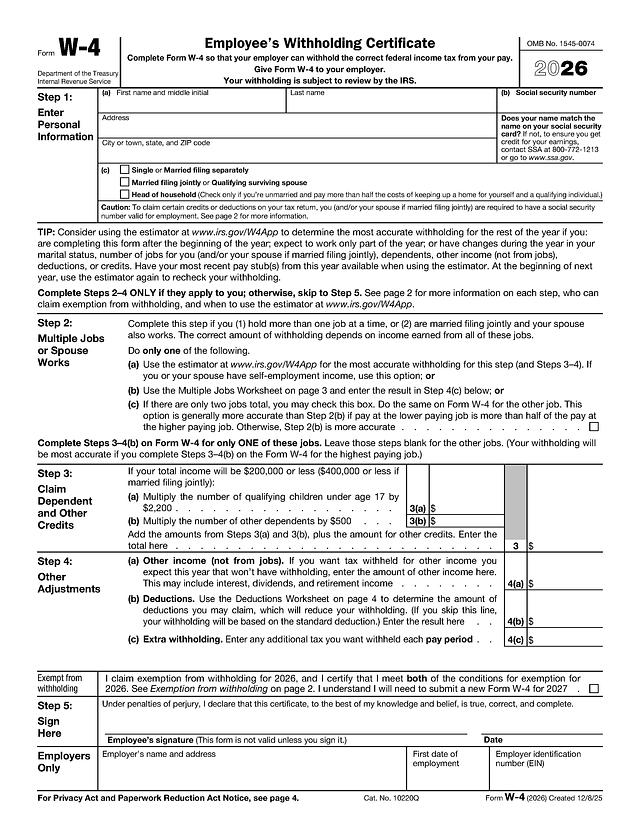
Form W-4, Employee's Withholding Certificate, tells your employer how much federal income tax to withhold from your pay. This template is the official IRS 2026 Form W-4, the same version posted on IRS.gov as of October 2026. It is five pages: the certificate itself on page 1, general and specific instructions on page 2, the Multiple Jobs Worksheet on page 3, the Deductions Worksheet on page 4, and the withholding tables used with the Multiple Jobs Worksheet on page 5.
The 2026 edition reflects recent law changes. The Deductions Worksheet now includes lines for qualified tips, qualified overtime compensation, passenger vehicle loan interest, and a deduction for seniors age 65 or older, and the claim for exemption from withholding has its own section below Step 4.
Who uses it
New employees complete a W-4 when they start a job, and existing employees submit a new one when they want to change their withholding, for example after marriage, a second job, or a new child. You give the form to your employer, not to the IRS. Nonresident aliens should read IRS Notice 1392 before completing it, as the form itself instructs.
What to have ready
- Your legal name, address, and social security number
- Your expected filing status for the year
- Pay information for every job you and your spouse (if filing jointly) hold, for Step 2
- The number of qualifying children under 17 and other dependents, for Step 3
- Estimates of other income and deductions you expect, for Step 4
- Your most recent pay stub if you are completing the form partway through the year
How to fill it out online
Click "Fill Template Now," type into the fields on page 1, sign in the Step 5 box, and download the PDF to hand to your employer or upload to its payroll system. Only Steps 1 and 5 are required for everyone; Steps 2 to 4 apply only if they fit your situation.
Step 1: Personal Information
Enter (a) your first name and middle initial, last name, and address, and (b) your social security number. In (c), check one filing status: Single or Married filing separately; Married filing jointly or Qualifying surviving spouse; or Head of household. The form notes that if your name doesn't match your social security card, you should contact the SSA.
Step 2: Multiple Jobs or Spouse Works
Complete this only if you hold more than one job at a time or are married filing jointly and your spouse also works. Choose one of three options: (a) the IRS Tax Withholding Estimator at IRS.gov/W4App, (b) the Multiple Jobs Worksheet on page 3 with the result entered in Step 4(c), or (c) the checkbox if there are only two jobs in total, checked on both jobs' forms.
Step 3: Claim Dependent and Other Credits
If your total income will be $200,000 or less ($400,000 or less if married filing jointly), enter in 3(a) the number of qualifying children under 17 multiplied by $2,200, and in 3(b) the number of other dependents multiplied by $500. Add them, plus any other credits, on line 3.
Step 4: Other Adjustments
Line 4(a) is other income not from jobs, such as interest, dividends, or retirement income. Line 4(b) is deductions from the page 4 worksheet; if you skip it, withholding is based on the standard deduction. Line 4(c) is any extra tax you want withheld each pay period.
Exempt from withholding
This checkbox certifies that you meet both conditions for exemption described on page 2. If you claim exemption, you complete only Steps 1(a), 1(b), and 5. The 2026 form states that you will need to submit a new Form W-4 by February 16, 2027 to keep the exemption.
Step 5 and the Employers Only section
Sign and date the form; it is not valid unless you sign it. You can add your signature with our PDF signing tool. The Employers Only row (employer's name and address, first date of employment, and EIN) is completed by your employer.
Where it goes and when
Give the completed form to your employer. Do not mail it to the IRS. Your employer uses it to set withholding from your paychecks, and your withholding is subject to IRS review. For details on when you must furnish a new certificate, the form refers you to IRS Publication 505. If you are deciding which options to choose, the official instructions and the estimator are the best guides, or speak with a tax professional.
Common mistakes
- Forgetting to sign Step 5, which makes the form invalid
- Completing Steps 3 to 4(b) on more than one job's W-4; the form says to complete them for only one job, ideally the highest paying
- Checking the Step 2(c) box on only one of the two jobs
- Claiming exemption without meeting both conditions on page 2
- Using an old W-4 edition instead of the current year's form
For a plain-language walkthrough, read our guide on how to fill out a W-4 for a new job.