What the Pennsylvania rental application is
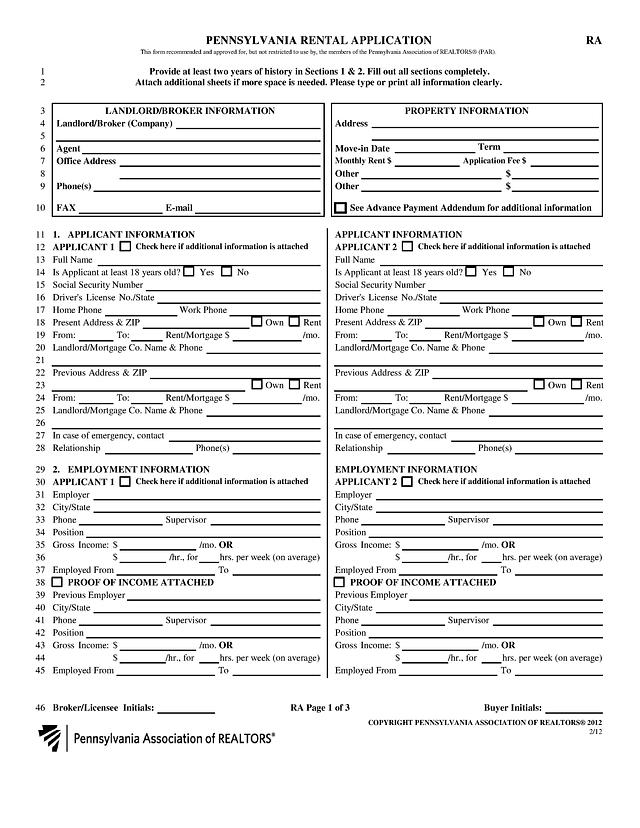
This is a three-page rental application written for use by members of the Pennsylvania Association of REALTORS® (form RA, 2/12). A prospective tenant fills it in so a landlord or broker can review their housing history, income and background before offering a lease. It is a private-industry form, not a government form, and a landlord may ask for a different one.
Who typically needs it
Anyone applying to rent a house or apartment in Pennsylvania through a landlord or a broker who uses the PAR form. Two applicants can fill in the same form side by side, which suits couples, roommates and co-signers. A landlord or property manager can also use it as the standard intake sheet for every prospect.
What you need before you start
- Addresses and dates for the last two years of housing history, with the name and phone number of each landlord or mortgage company.
- Employer name, supervisor, phone number, position and gross income for current and previous jobs.
- Bank, credit union and loan details if you want them listed.
- Vehicle make, model, year, colour and plate number.
- Your ID details. Think about where the form will be stored before entering a Social Security or driver's license number, and send it only to the landlord or broker you are applying with.
How to fill it out online with PDF Editify
- Click Fill Template Now on this page. The form opens in the editor with its fields ready.
- Click a field and type. Tick boxes with a single click.
- Add your signature with the sign tool (draw, type or upload).
- Download the finished PDF. Downloading needs a plan, such as the $3 One Week Plan, which expires on its own.
The page layout follows the printed form, so the walkthrough below uses its numbered sections.
Top of page 1: landlord and property
The landlord or broker normally fills in the company, agent, office address, phone, fax and email, along with the move-in date, term, monthly rent and application fee. If you are the applicant and these are blank, ask the landlord rather than guessing.
1. Applicant information
There are two columns, Applicant 1 and Applicant 2. Enter the full name, whether you are at least 18, Social Security number, driver's license number and state, and home and work phone. Then enter present and previous address with the from and to dates, whether you own or rent, the monthly rent or mortgage, and the landlord or lender. Add an emergency contact with relationship and phone. The form asks for at least two years of history across sections 1 and 2.
2. Employment information
List the current employer, city, phone, supervisor and position, then gross income either per month or as an hourly rate with average hours per week, and the employment dates. Tick the proof of income box only if you are attaching it. Repeat for a previous employer.
3 to 6: bank accounts, other income, liabilities and vehicles
Each section is a table with one row per item. Mark which applicant each row belongs to. The form notes that alimony, child support or separate maintenance income need not be revealed if you do not want it considered.
7 and 8: other occupants and pets
List every other occupant by full name and tick whether each is 18 or older. For pets, tick yes or no and describe type, name, breed, age and weight.
9 to 11: other information, property condition and special provisions
Section 9 asks a set of yes or no questions for each applicant, with space to explain any yes answer. Answer them yourself and read each question as printed. Section 10 states the property is leased as shown unless agreed in writing, and section 11 is for special provisions the parties agree on.
Signing and submitting
Section 12 is the authorization. Each applicant signs and dates it, confirming the information is true and allowing the landlord or broker to obtain background information. Read it before you sign. Send the finished PDF to the landlord or broker, and ask how they want the application fee paid. Page 4 holds the notices about civil rights and consumer reports; it is information for you and is not filled in. For a general walkthrough, see our rental application guide, or use the sign PDF tool for the signature step.
Deadlines and fees
The form has no deadline of its own. The application fee and the rent are written in by the landlord or broker, so confirm them with the landlord. Pennsylvania has rules on what a landlord may charge, so check current rules with the state or a local housing agency rather than relying on this page.
Common mistakes
- Leaving a section blank instead of writing N/A, which can make the application look incomplete.
- Giving less than two years of housing and work history.
- Putting both applicants' details in one column.
- Forgetting to tick "additional information is attached" when you add a sheet.
- Forgetting to date the signature in section 12.