What Form 2848 is
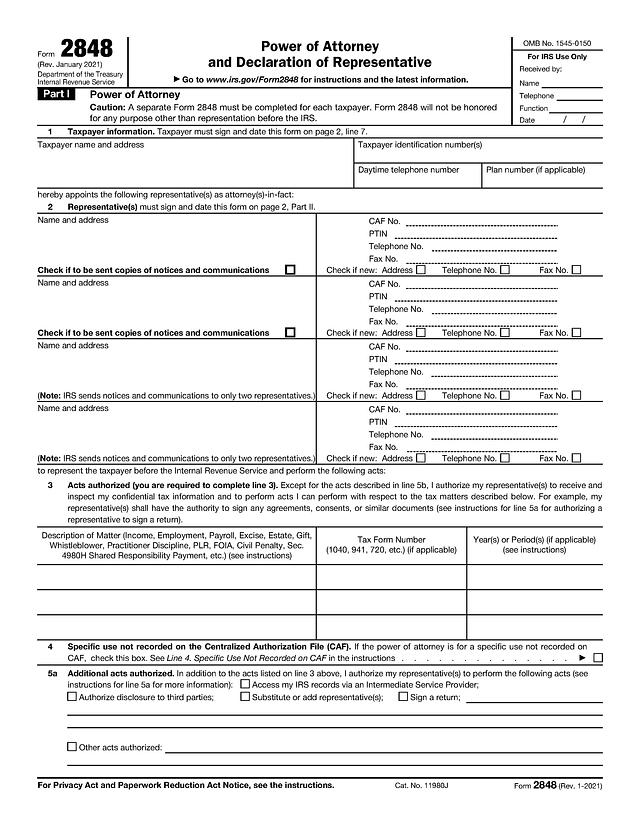
Form 2848, Power of Attorney and Declaration of Representative, lets a taxpayer authorize one or more eligible people to represent them before the Internal Revenue Service. This template is the two-page Rev. January 2021 edition, which the IRS About Form 2848 page still lists as current as of October 2026, alongside instructions revised in September 2021.
The form states that it will not be honored for any purpose other than representation before the IRS, so it does not replace a general power of attorney. If you only want someone to see or receive your tax information without representing you, the IRS offers a separate form, Form 8821.
Who uses Form 2848
Individuals, couples, businesses, trusts, and estates use it to appoint a representative for an audit, a collection matter, an installment agreement, a penalty question, or a similar issue. Representatives sign Part II and must be one of the categories listed on page 2: attorney, certified public accountant, enrolled agent, officer or full-time employee of the taxpayer, immediate family member, enrolled actuary, unenrolled return preparer (with limited authority), qualifying student or law graduate, or enrolled retirement plan agent.
What to have ready
- The taxpayer's name, address, daytime phone, and taxpayer identification number (SSN, ITIN, or EIN), plus the plan number for an employee plan
- Each representative's name, address, CAF number, PTIN, and phone and fax numbers
- The tax matters to cover: type of tax, form number, and specific years or periods
- Each representative's designation letter, licensing jurisdiction, and bar, license, or enrollment number
How to fill out Form 2848 online
Click "Fill Template Now", type into the fields on both pages, check the boxes you need, sign, and download the completed PDF. The walkthrough below follows the line numbers printed on the form.
Line 1, Taxpayer information
Enter the taxpayer name and address, the identification number in the matching box, the daytime telephone number, and a plan number if the matter concerns an employee plan. The IRS requires a separate Form 2848 for each taxpayer.
Line 2, Representative(s)
There is room for four representatives. For each, enter the name and address, CAF number, PTIN, telephone, and fax. The IRS instructions say to enter "None" if a representative has no CAF number yet. The "Check if to be sent copies" box appears only for the first two, because the IRS sends notices to no more than two representatives. Use the "Check if new" boxes when an address, phone, or fax number has changed.
Line 3, Acts authorized
This table is required. Each row asks for a Description of Matter (for example Income or Employment), a Tax Form Number (such as 1040 or 941), and Year(s) or Period(s). The instructions warn that the IRS will return a form that uses a general reference such as "All years" or "All taxes", and that future periods more than 3 years after December 31 of the year the IRS receives the form will not be recorded.
Line 4, Specific use not recorded on CAF
Check this box only for a specific-use authorization, such as a private letter ruling request. The IRS guidance on completing Form 2848 notes that checking it means the authorization is not recorded on the Centralized Authorization File (CAF).
Lines 5a and 5b, Additional acts and deletions
Line 5a has checkboxes for accessing IRS records via an Intermediate Service Provider, authorizing disclosure to third parties, substituting or adding representatives, signing a return, and other acts. Line 5b lets you list acts you do not authorize. The same IRS guidance explains that some entries here make the authorization "modified", which limits what representatives can do through certain IRS online tools.
Line 6, Retention or revocation
Filing a new Form 2848 automatically revokes earlier powers of attorney for the same matters and periods. Check the box to keep a prior one in effect, and attach a copy of it.
Line 7, Taxpayer signature
Sign, date, add a title if signing for an entity, and print the name. If the matter involves a joint return, each spouse must file a separate Form 2848.
Part II, Declaration of Representative
Each representative enters a designation letter (a-r), licensing jurisdiction, license or enrollment number, signature, and date, in the same order they appear on line 2. For designations d-f, the form asks for title or relationship in the jurisdiction column.
Signing and submitting
According to the IRS page Submit Forms 2848 and 8821 online, tax professionals can upload the form online, and electronic signatures are accepted for that channel. Forms sent by fax or mail must have a handwritten "wet ink" signature. The instructions include a Where To File chart that assigns a fax number and mailing address based on the taxpayer's state. When the taxpayer signs first, a domestic representative generally must sign within 45 days (60 days for taxpayers residing abroad).
Common mistakes
- Writing "All years" or "All taxes" on line 3 instead of listing specific periods
- Using one form for both spouses on a joint-return matter
- Checking line 4 when the authorization should be recorded on the CAF
- Leaving Part II unsigned or undated, which the form says will cause the IRS to return it
- Faxing or mailing a form with an electronic signature
For a longer walkthrough, see our Form 2848 guide. Questions about which matters or representatives to list belong with a qualified tax professional or the official instructions.